Assignment countdowns · for iPhone

Know what’s due before it’s urgent.

Deadline is an iPhone app for uni assignments. Each one gets a live countdown and a colour that goes from green to red as it closes in — so the one that needs you is always obvious.
  • Free
  • No account
  • No ads
  • iOS 16.4+
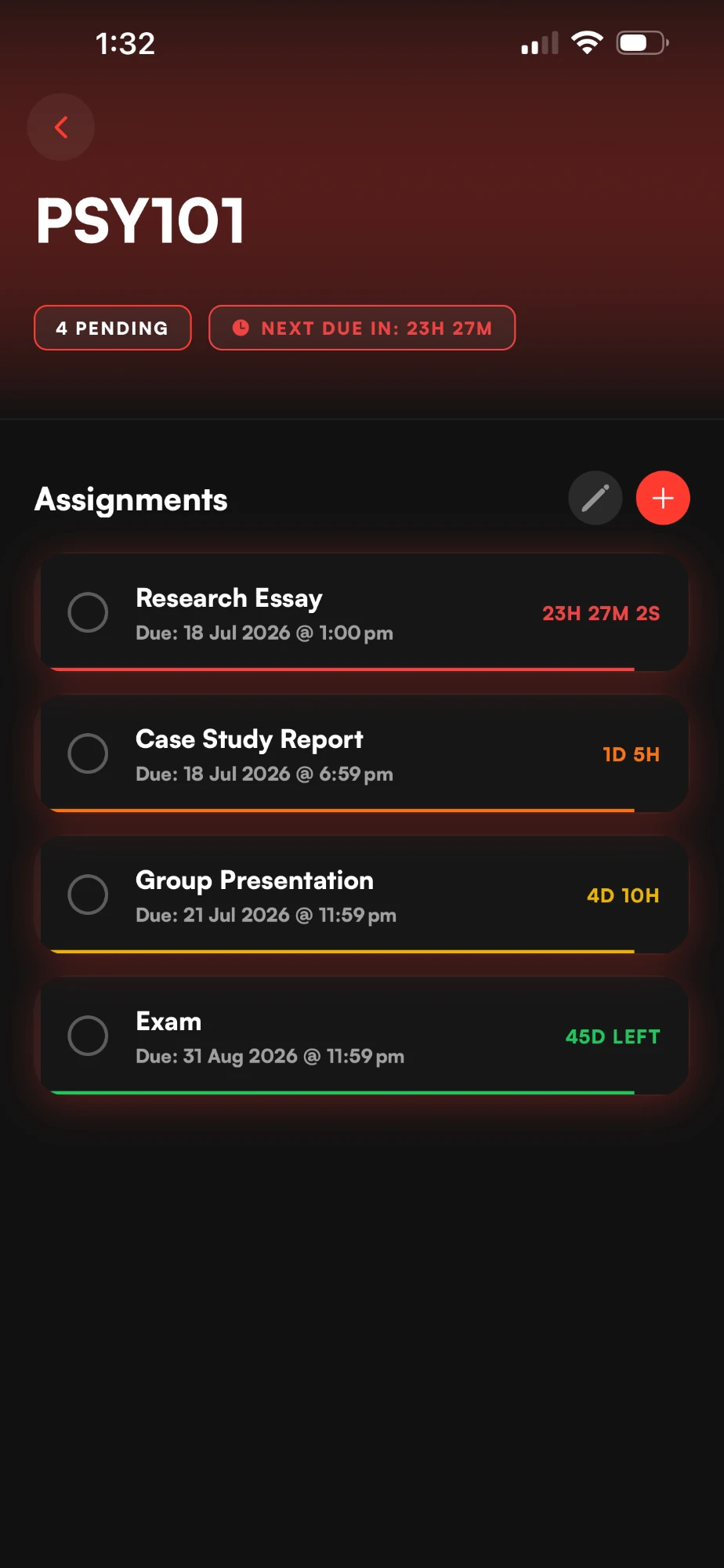
Deadline showing the PSY101 subject: four assignments, each with a countdown — Research Essay 23H 27M 2S in red, Case Study Report 1D 5H in orange, Group Presentation 4D 10H in yellow, Exam 45D LEFT in green.

Where your due dates live right now

Where your due dates actually live

  1. p.14 · unit outline (final).pdfpage 14 of a PDF you opened once.
  2. group chatthe group chat, three days late.
  3. calendar · last edited week 1a calendar you updated in week 1.
  4. your headyour head, at 2am.

You didn’t forget the date.
You forgot the time.

Thursday 9:00 am and Thursday 11:59 pm are the same date and a very different night. Deadline keeps both, and counts down to the minute it’s actually due.

The countdown

Colour tells you when to act.

Add an assignment and the countdown starts. You never set the colour — it changes on its own as the due date gets close.

  1. Plenty of time5+ days
  2. Coming up2–4 days
  3. Get moving24–48 hrs
  4. Due soonunder 24 hrs · ticking

Under 24 hours the card ticks by the second and its bar pulses. Switch on Extended Live Countdown in Settings and every card ticks.

PSY101
1 pending Next due in: —
Research Essay
Due: —
—
Try it with your own deadline

Built from the app’s own card, thresholds and timing. Tap the circle when it’s done.

The real app

Every subject. Every deadline. One screen.

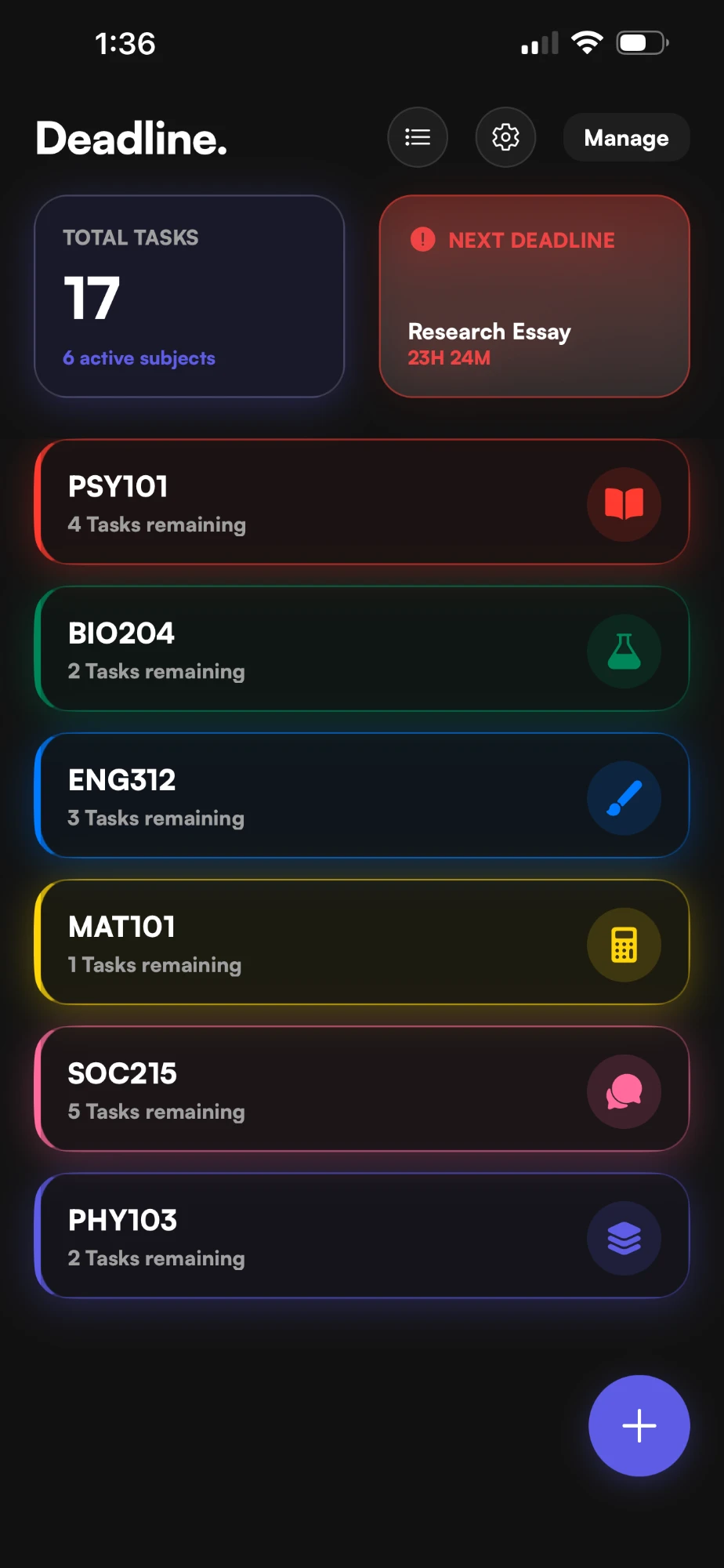
The Deadline dashboard: Total Tasks 17 across 6 active subjects, a Next Deadline card for Research Essay at 23H 24M, and six colour-coded subjects — PSY101, BIO204, ENG312, MAT101, SOC215, PHY103.

Your units, each in its own colour.

The dashboard keeps a running total and pins whatever’s due next to the top. Tap a unit to see its work.
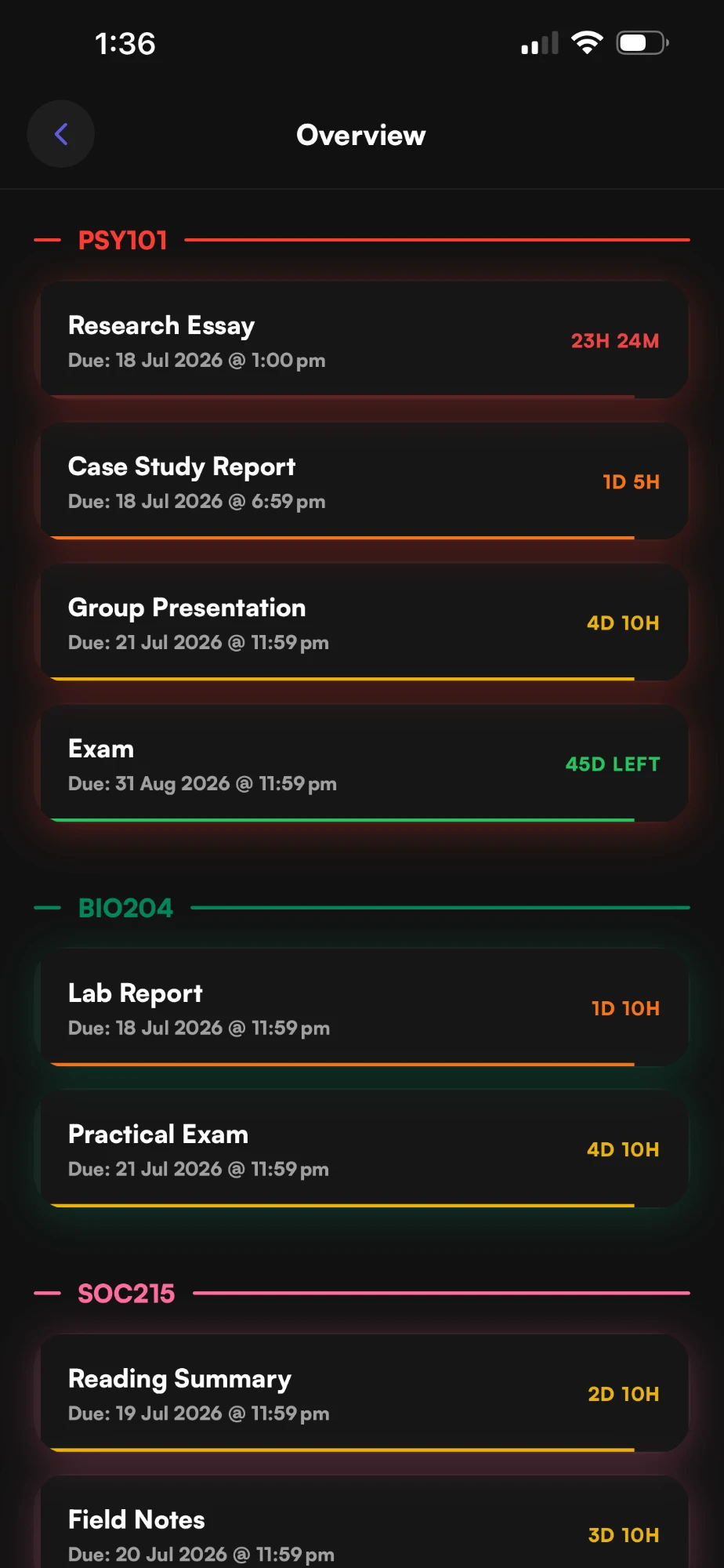
The Overview screen: every pending assignment grouped by subject and sorted by urgency, starting with PSY101’s Research Essay at 23H 24M.

Everything pending, in the order it’s due.

Overview puts every unit’s work in one list, closest first. Anything overdue goes straight to the top. Rude, but correct.

The PSY101 subject screen tinted red, with pending count, next-due pill and four assignment cards.

Open a unit and the whole screen takes its colour.

Header, buttons, the lot. You know which subject you’re in before you read a word.

Ten colours. Fifteen icons. Make it yours.

Pick a colour and an icon for each unit — the card recolours as you choose.

PSY101
4 Tasks remaining

How it works · real screen recordings

Seconds to add. Then it runs itself.

  1. 01

    Add your units.

    Name it, pick a colour and an icon. It lands on your dashboard.

  2. 02

    Add what’s due.

    Title, date, time. Due at midnight? End of Day (11:59 PM) is one tap.

  3. 03

    Tick it off.

    Done ones drop to Completed. Swipe left to delete — with an undo, in case.
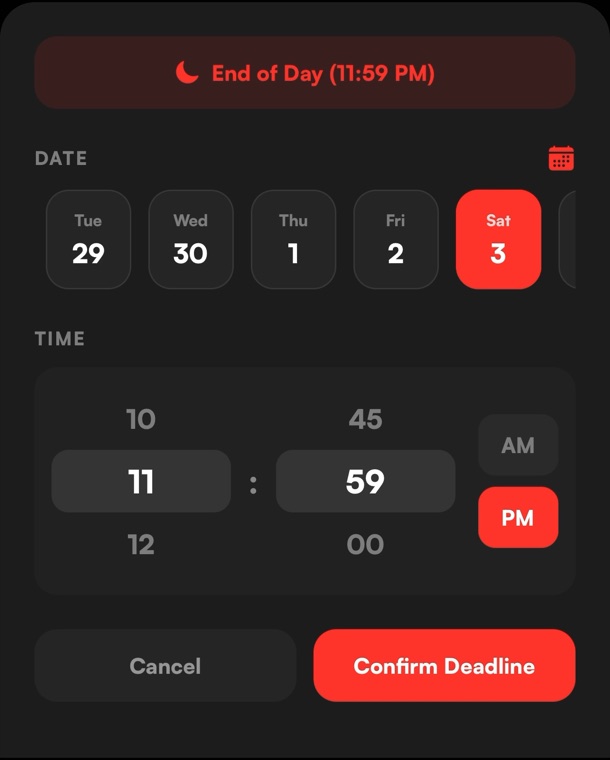
The Deadline date picker: an End of Day (11:59 PM) button, a row of days, an hour and minute wheel set to 11:59 PM, and a Confirm Deadline button.
A date picker that gets it. Days in a row, time on a wheel, and the 11:59 pm button right at the top.
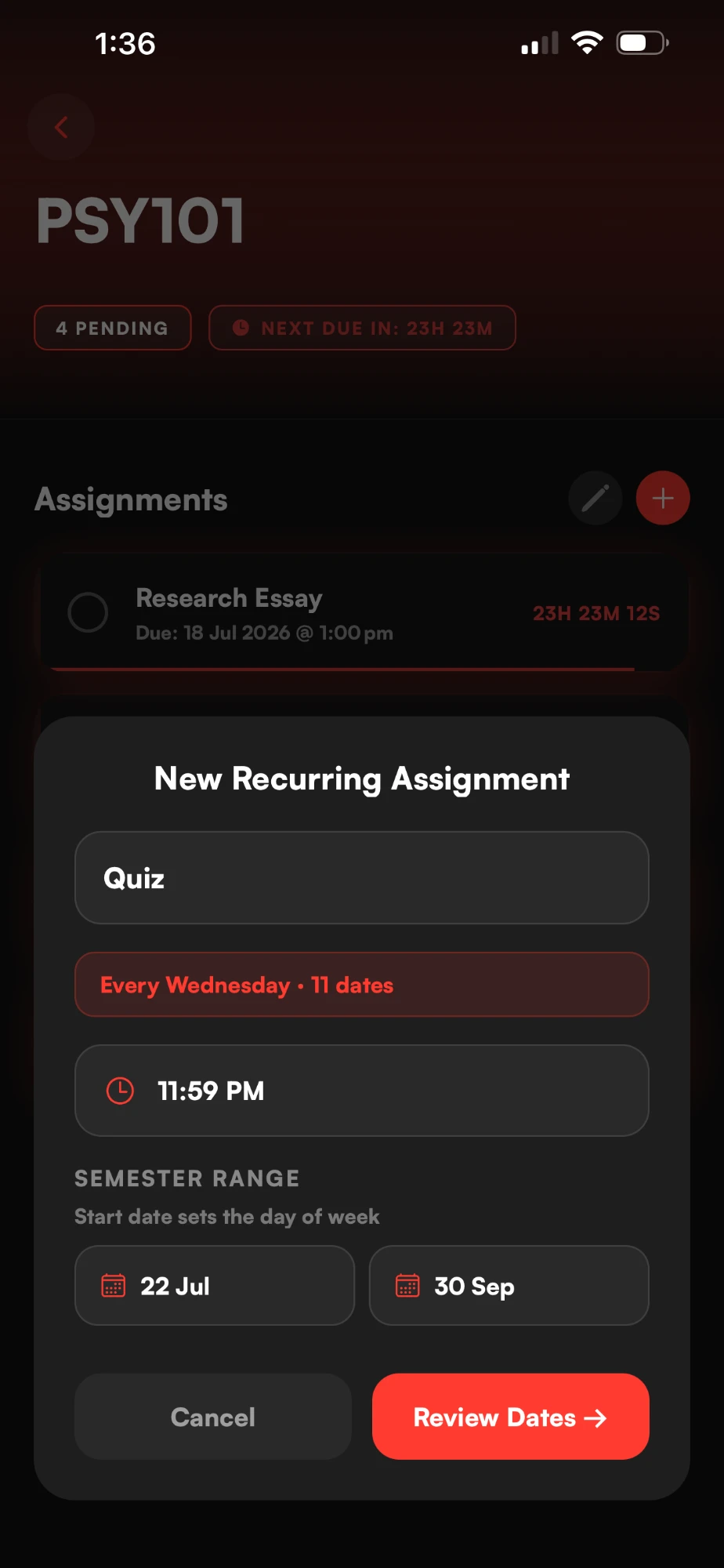
The New Recurring Assignment sheet: a Quiz set for every Wednesday at 11:59 PM, 11 dates between 22 July and 30 September.
Weekly quiz? Add it once. Pick the semester range and Deadline lays out every date for you to review.

Reminders

It tells you five times.

Every assignment gets five reminders — a week out, five days, two days, the day before and the final hour. The last two are marked Time Sensitive.

  1. 7 days before

    PSY101now

    📚 Research Essay is due in 7 days. Get ahead of it.

  2. 5 days before

    PSY101now

    📅 Research Essay is due in 5 days. Plan your time.

  3. 2 days before

    PSY101now

    ⚠️ Research Essay is due in 2 days. Time to start.

  4. 24 hours before

    PSY101Time Sensitive

    🔴 Research Essay is due TOMORROW. Don’t leave it.

  5. 1 hour before

    PSY101Time Sensitive

    🚨 FINAL HOUR. Research Essay is due in 1 hour!

Plus an optional daily reminder, at a time you pick

Don’t be that person submitting at 11:58 PM.

Rude. Accurate. It’s one of twelve lines Deadline picks from, like “Semester’s moving. Are you?”

Widgets

Due next, without opening anything.

Home Screen widgets in two sizes, and three for the Lock Screen. What’s next is there every time you pick up your phone.

Home Screen

Lock Screen

—

9:41

Widget previews use sample assignments and the widgets’ own layout and wording. Live times, counted from now.

Private by default

Nothing to sign up for.

  • No account.No email, no login. Open it and start.
  • It stays on your phone.Subjects, assignments and due dates are stored on your device. There’s no Deadline server to keep them.
  • Works offline.Lecture hall with no signal? Makes no difference.
  • No ads. No subscription.No in-app purchases either. It’s just free.

Optional, anonymous usage counts — like “an assignment was added” — help improve the app, and you can turn them off in Settings. Privacy policy

From the App Store

What people wrote.

★★★★★

“No subscription no IAP ad-free and does what it says on the tin.”
SZYX77 · App Store review, May 2026

★★★★★

“Very helpful and easy to use perfect for students”
Khatera.s · App Store review, May 2026

★★★★★

“…this one really stands out for its simplicity…”
javiddd1_ · App Store review, May 2026

The small stuff

Built for exactly one job.

No grades, no timetable, no study planner. Just what’s due, and how long you’ve got.

Five themes
Aurora, Midnight Rose, Neon Mint, Solar and Glacier. Try one:
Overdue first
Anything past due jumps to the top of Overview and takes over the Next Deadline card. It doesn’t get to hide.
Undo
Ticked the wrong one? Tap the circle again. Deleted it? Hit UNDO.
Fresh semester
Clear everything in Settings and start again in week 1.
It taps back
Haptics on nearly every action, the way an iPhone app should feel.
iPad too
Same app, bigger screen.

Questions.

Is it actually free?

Yes. No subscription, no in-app purchases, no ads. Every feature is there for everyone.

Do I need an account?

No. There’s nothing to sign up for — you open it and add your first subject.

Is it on Android?

Not yet. Deadline is on iPhone (and iPad) and needs iOS 16.4 or later. An Android version is in closed testing.

Does it connect to Canvas, Moodle or my calendar?

No. You add assignments yourself — a title, a date and a time. It takes seconds, and it means Deadline works with any uni and any course.

Does it track grades or study time?

No. It does one thing: what’s due, and how long you’ve got.

How do the colours work?

Green at five or more days out, yellow at two to four, orange inside 48 hours and red inside 24 — when the card starts ticking by the second. It changes on its own.

Where does my data go?

Nowhere. Your subjects and assignments stay on your phone. Delete the app and they go with it. More in the privacy policy.

Can I turn the reminders off?

Yes — they’re regular iPhone notifications. The daily reminder is off until you switch it on, and you choose its time.

Found a bug or have an idea?

Email deadlineapp.contact@gmail.com. A real person reads every one. There’s more on the support page.

Put your worst deadline in first.

Research Essay
Due: —
—

That’s how long you’ve got. Might as well know.

Download on theApp Store
  • Free
  • No account
  • iPhone & iPad